|
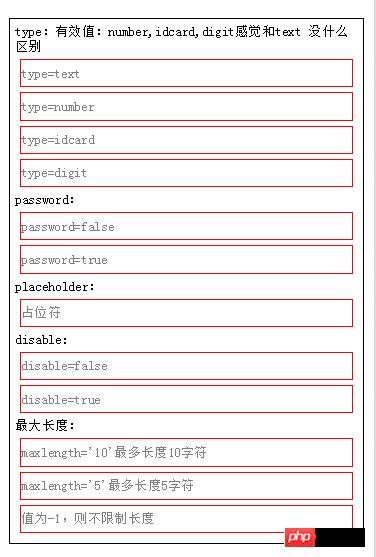
導(dǎo)讀微信小程序,簡稱小程序,英文名Mini Program,是一種不需要下載安裝即可使用的應(yīng)用,它實現(xiàn)了應(yīng)用“觸手可及”的夢想,用戶掃一掃或搜一下即可打開應(yīng)用。小程序是一種不用下載就能使用的應(yīng)用,也是一... 微信小程序,簡稱小程序,英文名Mini Program,是一種不需要下載安裝即可使用的應(yīng)用,它實現(xiàn)了應(yīng)用“觸手可及”的夢想,用戶掃一掃或搜一下即可打開應(yīng)用。小程序是一種不用下載就能使用的應(yīng)用,也是一項門檻非常高的創(chuàng)新,經(jīng)過將近兩年的發(fā)展,已經(jīng)構(gòu)造了新的小程序開發(fā)環(huán)境和開發(fā)者生態(tài)。 input輸入框組件說明:本文介紹input 輸入框的各種參數(shù)及特性。 input輸入框示例代碼運行效果如下:
下面是WXML代碼: [XML] <view class="content">
type:有效值:text 感覺沒什么區(qū)別
<input placeholder="type=text" type="text" value="" />
<input placeholder="type=number" type="number" value="" />
<input placeholder="type=idcard" type="idcard" value="" />
<input placeholder="type=digit" type="digit" value="" />
password:
<input type="text" password="{{false}}" placeholder="請輸入密碼"/>
<input type="text" password="{{true}}" placeholder="請輸入密碼"/>
placeholder:
<input placeholder="占位符" />
disable:
<input placeholder="disable={{false}}" disabled='{{false}}'/>
<input placeholder="disable={{true}}" disabled='{{true}}'/>
最大長度:
<input maxlength="10" placeholder="maxlength='10'最多長度10字符"/>
<input maxlength="5" placeholder="maxlength='5'最多長度5字符"/>
<input maxlength="-1" placeholder="值為-1,則不限制長度"/>
</view>下面是WXSS代碼: [JavaScript] .content{
border:1px black solid;
margin: 10px;
font-size: 10pt;
padding: 5px;
}
input{
border:1px red solid;
margin: 5px;
}下面是WXML代碼: [XML] <view class="content">
bindinput="當(dāng)內(nèi)容改變"
<input bindinput="bindinput"/>
bindfocus:當(dāng)獲取焦點
<input bindfocus="bindfocus"/>
bindblur:當(dāng)失去焦點觸發(fā)
<input bindblur="bindblur"/>
內(nèi)容:
<view style="color:blue">
{{log}}
</view>
</view>下面是JS代碼: [JavaScript] Page({
data:{
log:'事件觸發(fā)'
},
bindblur:function(e){
var value=e.detail.value;
this.setData({
log:"bindblur失去焦點.輸入框值="+value
})
},
bindinput:function(e){
var value=e.detail.value;
this.setData({
log:"bindinput內(nèi)容改變.輸入框值="+value
})
},
bindfocus:function(e){
var value=e.detail.value;
this.setData({
log:"bindfocus獲取焦點.輸入框值="+value
})
}
})下面是WXSS代碼: [JavaScript] .content{
border:1px black solid;
margin: 10px;
font-size: 10pt;
padding: 5px;
}
input{
border:1px red solid;
margin: 5px;
}組件屬性:
屬性解析: 下面是WXML代碼: [XML] <!--屬性:-->
<!--value:輸入框內(nèi)容-->
<input value="內(nèi)容"/>
<!--type:有效類型text,number,idcard,digit,小編感覺其他三個和text沒有明顯區(qū)別,不清楚是什么問題,正常number應(yīng)該只允許輸入數(shù)字,但結(jié)果和text一樣-->
<input type="text"/>
<input type="number"/>
<input type="idcard"/>
<input type="digit"/>
<!--password:密碼格式 boolean需要{{}}表示-->
<input password="{{true}}"/>
<input password/> 等同于 <input password="{{false}}"/>
<!--placeholder:占位符,對輸入框內(nèi)容提示-->
<input placeholder="占位符" placeholder-class="占位符靜態(tài)樣式" placeholder-style="占位符動態(tài)樣式,可用{{}}進行動態(tài)賦值"/>
<!--disabled:控制標簽有效,或者失效狀態(tài),在失效狀態(tài),不能獲取該值-->
<input disabled="{{true}}"/>
<input disabled/> 等同于 <input disabled="{{false}}"/>
<!--maxlength:內(nèi)容長度限制,默認140-->
<input maxlength="100"/>
<input maxlength/> 等同于 <input maxlength="140"/>
<!--focus:初始化時,獲取輸入焦點(目前開發(fā)工具暫不支持)-->
<input focus="{{true}}"/>
<input focus/> 等同于 <input focus="{{false}}"/>
<!--auto-focus:當(dāng)界面只有一個input,自動獲取焦點-->
<input auto-focus="{{true}}"/>
<input auto-focus/> 等同于 <input auto-focus="{{false}}"/>
<!--事件:-->
<!--bindinput:當(dāng)內(nèi)容改動時觸發(fā)-->
<input bindinput="自己定義函數(shù)名">
<!--bindfocus:當(dāng)獲取焦點,可用輸入狀態(tài)時觸發(fā)-->
<input bindfocus="自己定義函數(shù)名">
<!--bindblur:當(dāng)失去焦點觸發(fā)-->
<input bindblur="自己定義函數(shù)名">以上就是微信小程序組件解讀和分析之input輸入框的詳細內(nèi)容,更多請關(guān)注php中文網(wǎng)其它相關(guān)文章! 小程序是一種不需要下載安裝即可使用的應(yīng)用,它實現(xiàn)了應(yīng)用“觸手可及”的夢想,用戶掃一掃或者搜一下即可打開應(yīng)用。 |
溫馨提示:喜歡本站的話,請收藏一下本站!
本站發(fā)布的Win7純凈版系統(tǒng)、Win10純凈版和XP純凈版系統(tǒng)僅為個人學(xué)習(xí)測試使用,請在下載后24小時內(nèi)刪除,不得用于任何商業(yè)用途,否則后果自負,請支持購買微軟正版軟件!
本站所有資源全部來自于網(wǎng)絡(luò)資源,如侵犯到您的權(quán)益,請及時通知我們(peng896066052@126.com),我們會及時處理.
Copyright © 2018-2020 雨林木風(fēng)下載站