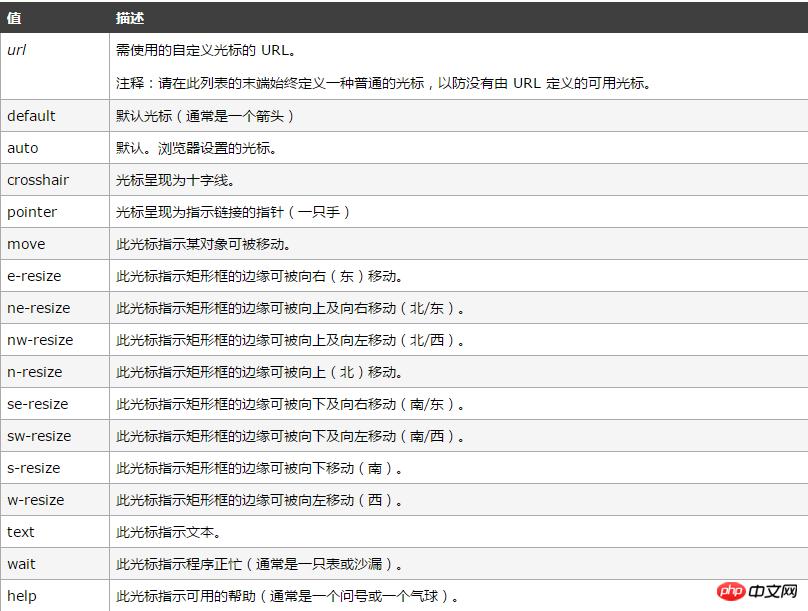
|
導讀網頁的本質就是超級文本標記語言,通過結合使用其他的Web技術(如:腳本語言、公共網關接口、組件等),可以創造出功能強大的網頁。因而,超級文本標記語言是萬維網(Web)編程的基礎,也就是說萬維網是建立... 網頁的本質就是超級文本標記語言,通過結合使用其他的Web技術(如:腳本語言、公共網關接口、組件等),可以創造出功能強大的網頁。因而,超級文本標記語言是萬維網(Web)編程的基礎,也就是說萬維網是建立在超文本基礎之上的。超級文本標記語言之所以稱為超文本標記語言,是因為文本中包含了所謂“超級鏈接”點。 現如今前端網頁的開發越來越注重設計感,這些設計感更體現在細節處,今天向大家具體介紹一下各式各樣的開關按鈕是如何使用HTML5+css3制作出來的,希望可以幫到大家。使用HTML5+css3制作按鈕開關的原理
使用HTML5+css3制作按鈕開關的代碼 <!DOCTYPE html>
<html>
<head>
<meta charset="UTF-8">
<title>各式各樣的按鈕</title>
<style type="text/css">
*{
margin: 0;
padding: 0;
}
.wrap{
width: 600px;
height: 400px;
margin: 0 auto;
/*background: pink;*/
padding: 30px 50px;
}
/*div按鈕*/
.button5{
width: 100px;
height: 30px;
float: left;
/*position: absolute;*/
text-align: center;
padding-top: 10px;
margin:0px 10px ;
background: greenyellow;
border: 1px solid plum;
cursor: pointer;
border-radius: 50%;
}
/*鏈接按鈕*/
.button2{
background: gold;
border: 1px solid greenyellow;
text-decoration: none;
display: inline-block;
padding: 10px 22px;
border-radius: 20px;
/*cursor: pointer;靠近按鈕的一只手*/
}
/*按鈕*/
.button3{
background: pink;
border: 1px solid blueviolet;
padding: 10px 28px;
cursor: pointer;
color: yellow;
border-radius: 40%;
}
/*輸入框按鈕*/
.button4{
background: cornflowerblue;
border: 3px solid yellow;
padding: 10px 20px;
border-radius: 20%;
outline-style: none;/*去除點擊時外部框線*/
}
/*懸停變色按鈕*/
.button6{
background: plum;
color: greenyellow;
border: 1px solid dodgerblue;
transition-duration: 1s;/*過渡時間*/
border-radius: 12px;
padding: 13px 18px;
margin-top: 20px;
outline-style: none;/*去除點擊時外部框線*/
}
.button6:hover{
background: yellow;
color: magenta;
transition-duration: 1s;
}
/*陰影按鈕*/
.button7{
/*display: inline-block;*/
border: none;
background: lime;
padding: 13px 18px;
margin-top: 20px;
/*outline-style: none;!*去除點擊時外部框線*!*/
/*-webkit-transition-duration: 0.6s;*/
transition-duration: 0.6s;
/*設置按鈕陰影*/
box-shadow: 0 8px 16px 0 rgba(0,255,0,0.2),0 6px 20px 0 rgba(0,0,255,0.1);
}
/*懸停出現陰影按鈕*/
.button8{
border: none;
background: dodgerblue;
padding: 13px 18px;
margin-top: 20px;
transition-duration: 0.6s;
}
.button8:hover{
box-shadow: 0 12px 16px 0 rgba(0,255,0,0.24),0 17px 50px 0 rgba(0,0,255,0.19);
}
/*禁用按鈕*/
.button9{
border: none;
background: green;
padding: 13px 18px;
margin-top: 20px;
opacity: 0.6;/*設置按鈕的透明度*/
cursor: not-allowed;/*設置按鈕為禁用狀態*/
}
/*箭頭標記按鈕*/
.button10{
display: inline-block;
border: none;
background: red;
color: white;
padding: 20px;
text-align: center;
border-radius: 4px;
width: 180px;
font-size: 16px;/*可以通過字體控制button大小*/
transition: all 0.5s;
margin: 5px;
cursor: pointer;
}
.button10 span{
cursor: pointer;
display: inline-block;
position: relative;
transition: 0.5s;
}
.button10 span:after{
content: '?';
color: white;
position: absolute;
opacity: 0;/*先設置透明度為0,即不可見*/
right:-20px;/*新增箭頭出來的方向*/
transition: 0.5s;
}
.button10:hover span{
padding-right: 15px;/*新增箭頭與前面文字的距離*/
}
.button10:hover span:after{
opacity: 1;/*設置透明度為1,即可見狀態*/
right: 0;
}
/*點擊出現波紋效果按鈕*/
.button11{
position: relative;/*必須添上這一句,否則波紋布滿整個頁面*/
background: dodgerblue;
border: none;
color: white;
width: 180px;
font-size: 16px;/*可以通過字體控制button大小*/
padding: 20px;
border-radius: 12px;
transition-duration: 0.4s;
overflow: hidden;
outline-style: none;/*去除點擊時外部框線*/
}
.button11:after{
content:"";
background: aquamarine;
opacity: 0;
display: block;
position: absolute;
padding-top: 300%;
padding-left: 350%;
margin-left: -20px!important;
margin-top: -120%;
transition: all 0.5s;
}
.button11:active:after{
padding: 0;
margin: 0;
opacity: 1;
transition: 0.1s;
}
/*點擊出現按壓效果*/
.button12{
outline-style: none;/*去除點擊時外部框線*/
padding: 20px;
color: white;
background: yellow;
border: none;
border-radius: 12px;
box-shadow: 0px 9px 0px rgba(144,144,144,1),0px 9px 25px rgba(0,0,0,.7);
}
.button12:hover{
background: gold;
}
.button12:active{
background: gold;
box-shadow: 0 5px #666;
transform: translateY(4px);
transition-duration: 0s;/*過渡效果持續時間*/
}
</style>
</head>
<body>
<div>
<div>5div按鈕</div>
<p style="clear: both"><br></p>
<button>1默認按鈕</button>
<a href="#">2鏈接按鈕</a>
<button>3按鈕</button>
<input type="button" value="4輸入框按鈕">
<button>6懸停變色按鈕</button>
<button>7陰影按鈕</button>
<button>8懸停出現陰影</button>
<button>9禁用按鈕</button>
<button style="vertical-align: middle"><span>10箭頭標記按鈕</span></button>
<button>11波紋click</button>
<button>12按壓效果click</button>
</div>
</body>
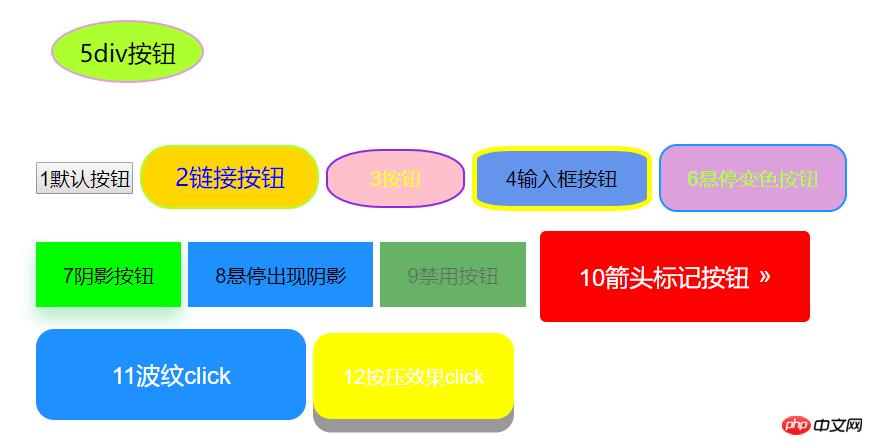
</html>按鈕開關樣式如圖所示
以上就是如何使用HTML5+css3制作出12種常用的按鈕開關樣式(附完整代碼)的詳細內容,更多請關注php中文網其它相關文章! 網站建設是一個廣義的術語,涵蓋了許多不同的技能和學科中所使用的生產和維護的網站。 |
溫馨提示:喜歡本站的話,請收藏一下本站!
本站發布的Win7純凈版系統、Win10純凈版和XP純凈版系統僅為個人學習測試使用,請在下載后24小時內刪除,不得用于任何商業用途,否則后果自負,請支持購買微軟正版軟件!
本站所有資源全部來自于網絡資源,如侵犯到您的權益,請及時通知我們(peng896066052@126.com),我們會及時處理.
Copyright © 2018-2020 雨林木風下載站