|
導讀網頁的本質就是超級文本標記語言,通過結合使用其他的Web技術(如:腳本語言、公共網關接口、組件等),可以創造出功能強大的網頁。因而,超級文本標記語言是萬維網(Web)編程的基礎,也就是說萬維網是建立... 網頁的本質就是超級文本標記語言,通過結合使用其他的Web技術(如:腳本語言、公共網關接口、組件等),可以創造出功能強大的網頁。因而,超級文本標記語言是萬維網(Web)編程的基礎,也就是說萬維網是建立在超文本基礎之上的。超級文本標記語言之所以稱為超文本標記語言,是因為文本中包含了所謂“超級鏈接”點。 本篇文章給大家帶來的內容是關于CSS偽元素和Content屬性的詳細分析(代碼示例),有一定的參考價值,有需要的朋友可以參考一下,希望對你有所幫助。繼上篇深入了解CSS偽類選擇器的用法(代碼示例)記錄完偽類后,我自然而然要向偽元素伸出“魔掌”的啦。本文講講述偽元素以及功能強大的Contet屬性,讓我們可以通過偽元素更好地實現更多的可能! 初識偽元素?說起偽元素我第一想到的莫過于
?那為什么會這兩好處呢?原因就是偽元素并不存在于DOM中,而是位于CSSOM,HTML代碼和DOM Tree中均沒有它的身影,量少了自然效率有所提升。但這也引入一個問題——我們沒辦法通過JavaScript完全操控偽元素(我將在下面一節為大家講述) 一大波偽元素來了除了::before和::after外,別漏了以下的哦! :first-line:只能用于塊級元素。用于設置附屬元素的第一個行內容的樣式。可用的CSS屬性為font,color,background,word-spacing,letter-spacing,text-decoration,vertical-align,text-transform,line-height,clear。 :first-letter:只能用于塊級元素。用于設置附屬元素的第一個字母的樣式。可用的CSS屬性為font,color,background,marin,padding,border,text-decoration,vertical-align,text-transform,line-height,float,clear。 ::selection:匹配選中部分的內容。可用的CSS屬性為background,color。 有沒有發現有的偽元素前綴是:有的卻是::呢?::是CSS3的寫法,其實除了::selection外,其他偽元素既兩種前綴都是可以的,為兼容性可選擇使用:,為容易區分偽元素和偽類則使用::,但我還是建議使用::來提高可讀性,兼容性就讓postcss等工具幫我們處理就好了。 ::before和::after的注意事項 默認display: inline; 必須設置content屬性,否則一切都是無用功; 默認user-select: none,就是::before和::after的內容無法被用戶選中的; 偽元素和偽類結合使用形如:.target:hover::after。 JavaScript操作偽元素?上文提到由于偽元素僅位于CSSOM中,因此我們僅能通過操作CSSOM API——window.getComputedStyle來讀取偽元素的樣式信息,注意:我們能做的就是讀取,無法設置的哦! {- window.getComputedStyle的類型 -}
data PseudoElement = ":before" | "::before" | ":after" | "::after" | ":first-line" | "::first-line" | ":first-letter" | "::first-letter" | "::selection" | ":backdrop" | "::backdrop" | Null
window.getComputedStyle :: HTMLElement -> PesudoElement -> CSSStyleDeclaration
{- CSSStyleDeclaration實例的方法 -}
data CSSPropertyName = "float" | "backround-color" | ......
data DOMPropertyName = "cssFloat" | "styleFloat" | "backgroundColor" | ......
-- IE9+的方法
CSSStyleDeclaration#getPropertyValue :: CSSPropertyName -> *
-- IE6~8的方法
CSSStyleDeclaration#getAttribute :: CSSPropertyName -> *
-- 鍵值對方式獲取
CSSStyleDeclaration#[DOMPropertyName] -> *示例: .target[title="hello world"]::after{
display: inline-block;
content: attr(title);
background: red;
text-decoration: underline;
}
const elTarget = document.querySelector(".target")
const computedStyle = window.getComputedStyle(elTarget, "::after")
const content = computedStyle.getPropertyValue("content")
const bg = computedStyle.getAttribute("backgroundColor")
const txtDecoration = computedStyle["text-decoration"]
console.log(content) // "hello world"
console.log(bg) // red
console.log(txtDecoration) // underline玩透Content屬性?到這里我們已經可以利用::before和::after實現tooltip等效果了,但其實更為強大的且更需花時間研究的才剛要開始呢!那就是Content屬性,不僅僅可以簡單直接地設置一個字符串作為偽元素的內容,它還具備一定限度的編程能力,就如上面attr(title)那樣,以其附屬元素的title特性作為content值。下面請允許我為大家介紹吧! p::after{
content: "普通字符串";
content: attr(父元素的html屬性名稱);
content: url(圖片、音頻、視頻等資源的url);
/* 使用unicode字符集,采用4位16進制編碼
* 但不同的瀏覽器顯示存在差異,而且移動端識別度更差
*/
content: "\21e0";
/* content的多個值可以任意組合,各部分通過空格分隔 */
content: "'" attr(title) "'";
/* 自增計數器,用于插入數字/字母/羅馬數字編號
* counter-reset: [<identifier> <integer>?]+,必選,用于標識自增計數器的作用范圍,<identifier>為自定義名稱,<integer>為起始編號默認為0。
* counter-increment: [<identifier> <integer>?]+,用于標識計數器與實際關聯的范圍,<identifier>為counter-reset中的自定義名稱,<integer>為步長默認為1。
* <list-style-type>: disc | circle | square | decimal | decimal-leading-zero | lower-roman | upper-roman | lower-greek | lower-latin | upper-latin | armenian | georgian | lower-alpha | upper-alpha
*/
content: counter(<identifier>, <list-style-type>);
/* 以父附屬元素的qutoes值作為content的值
*/
content: open-quote | close-quote | no-open-quote | no-close-quote;
}換行符:HTML實體為
,CSS為\A,JS為\uA。 ?可以看到Content接受6種類型,和一種組合方式。其中最后兩種比較復雜,我們后面逐一說明。 自定義計數器?HTML為我們提供 <!-- HTML 部分-->
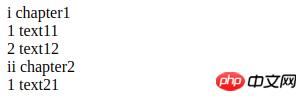
.dl
.dt{chapter1}
.dd{text11}
.dd{text12}
.dt{chapter2}
.dd{text21}
/* CSS部分 */
.dl {
counter-reset: dt 0; /* 表示解析到.dl時,重置dt計數器為0 */
& .dt {
counter-reset: dd 0; /* 表示解析到.dt時,重置dd計數器為0 */
&::before{
counter-increment: dt 1; /* 表示解析到.dt時,dt計數器自增1 */
content: counter(dt, lower-roman) " ";
}
}
& .dd::before {
counter-increment: dd 1; /* 表示解析到.dd時,dd計數器自增1 */
content: counter(dd) " ";
}
}
通過counter-reset來定義和重置計數器,通過counter-increment來增加計數器的值,然后通過counter來決定使用哪個計數器,并指定使用哪種樣式。 const globalCounters = {"__temp":{}}
function resetCounter(name, value){
globalCounters[name] = value
}
function incrementCounter(name, step){
const oVal = globalCounters[name]
if (oVal){
globalCounters[name] = oVal + step
}
else{
globalCounters.__temp[name] = step
}
}
function counter(name, style){
return globalCounters[name] || globalCounters.__temp[name]
}
function applyCSS(mount){
const clz = mount.className
if (clz == "dl"){
resetCounter("dt", 0)
const children = mount.children
for (let i = 0; i < children.length; ++i){
applyCSS(children[i])
}
}
else if (clz == "dt"){
resetCounter("dd", 0)
incrementCounter("dt", 1)
const elAsBefore = document.createElement("span")
elAsBefore.textContent = counter("dt", "lower-roman") + " "
mount.insertBefore(mount.firstChild)
}
else if (clz == "dd"){
incrementCounter("dd", 1)
const elAsBefore = document.createElement("span")
elAsBefore.textContent = counter("dd", "lower-roman") + " "
mount.insertBefore(mount.firstChild)
}
}嵌套計數器?對于多層嵌套計數器我們可以使用counters(<identifier>, <separator>, <list-style-type>?) .ol
.li
.ol
.li{a}
.li{b}
.li
.ol
.li{c}.ol {
counter-reset: ol;
& .li::before {
counter-increment: ol;
content: counters(ol, ".");
}
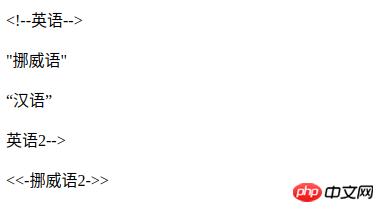
}Content的限制IE8+才支持Content屬性; 除了Opera9.5+中所有元素均支持外,其他瀏覽器僅能用于:before,:after內使用; 無法通過JS獲取Counter和Counters的運算結果。得到的就只能是"counter(mycouonter) \" \""。 自定義引號?引號這個平時很少在意的符號,其實在不同的文化中使用的引號將不盡相同,如簡體中文地區使用的"",而日本則使用「」。那我們根據需求自定義引號呢?答案是肯定的。 p[lang=en]>q{英語}
p[lang=no]>q{挪威語}
p[lang=zh]>q{漢語}
p[lang=en]>q.no-quote{英語2}
div[lang=no]>.quote{挪威語2}CSS片段: p[lang=en] > q{
quotes: "<!--" "-->"; /* 定義引號 */
}
p[lang=en] > q.no-quote::before{
content: no-open-quote;
/*或者 content: none;*/
}
div[lang=no] > .quote {
quotes: "<<-" "->>";
}
div[lang=no] > .quote::before {
content: open-quote;
}
div[lang=no] > .quote::after {
content: close-quote;
}
示例分割線p.sep{or}.sep {
position: relative;
text-align: center;
&::before,
&::after {
content: "";
box-sizing: border-box;
height: 1px;
width: 50%;
border-left: 3em solid transparent;
border-right: 3em solid transparent;
position: absolute;
top: 50%;
}
&::before {
left: 0;
}
&::after {
right: 0;
}
}只讀效果(通過遮罩原來的元素實現).input-group {
position: relative;
&.readonly::before {
content: "";
position: absolute;
width: 100%;
height: 100%;
top: 0;
left: 0;
}
}計數器.selections>input[type=checkbox]{option1}+input[type=checkbox]{option2}
.selection-count.selections{
counter-reset: selection-count;
& input:checked {
counter-increment: selection-count;
}
}
.selection-count::before {
content: counter(selection-count);
}以上就是CSS偽元素和Content屬性的詳細分析(代碼示例)的詳細內容,更多請關注php中文網其它相關文章! 網站建設是一個廣義的術語,涵蓋了許多不同的技能和學科中所使用的生產和維護的網站。 |
溫馨提示:喜歡本站的話,請收藏一下本站!
本站發布的Win7純凈版系統、Win10純凈版和XP純凈版系統僅為個人學習測試使用,請在下載后24小時內刪除,不得用于任何商業用途,否則后果自負,請支持購買微軟正版軟件!
本站所有資源全部來自于網絡資源,如侵犯到您的權益,請及時通知我們(peng896066052@126.com),我們會及時處理.
Copyright © 2018-2020 雨林木風下載站