|
導讀網頁的本質就是超級文本標記語言,通過結合使用其他的Web技術(如:腳本語言、公共網關接口、組件等),可以創造出功能強大的網頁。因而,超級文本標記語言是萬維網(Web)編程的基礎,也就是說萬維網是建立... 網頁的本質就是超級文本標記語言,通過結合使用其他的Web技術(如:腳本語言、公共網關接口、組件等),可以創造出功能強大的網頁。因而,超級文本標記語言是萬維網(Web)編程的基礎,也就是說萬維網是建立在超文本基礎之上的。超級文本標記語言之所以稱為超文本標記語言,是因為文本中包含了所謂“超級鏈接”點。 在前端網頁開發的時候,往往會用到一些漸變色的效果,這樣可以使得前端頁面更加美觀。那么這些漸變效果是如何用css代碼實現出來的?本章就給大家帶來css如何實現漸變效果?css背景色漸變與文字漸變效果的實現(代碼實例),介紹css 漸變樣式和如何實現css漸變。有一定的參考價值,有需要的朋友可以參考一下,希望對你有所幫助。一、css 背景色漸變 樣式 1. css 線性背景漸變樣式 語法: background-image: linear-gradient(<point> || <angle>, <stop>, <stop> , <stop>) 第一個參數是漸變起始點或角。第二個參數是一種顏色停止點(color stops)。至少需要兩種顏色(起點和終點),你可以添加任意種顏色來增加顏色漸變的豐富程度。對顏色停止點的定義可以是一種顏色,或一種顏色加一個百分比。 代碼(考慮瀏覽器兼容性): <!DOCTYPE html>
<html>
<head>
<meta charset="UTF-8">
<title>css背景漸變--線性漸變</title>
<style>
.demo{
width:500 ;
height: 300;
margin: 50px auto;
}
.demo *{
width: 200px;
height: 200px;
margin: 20px;
text-align: center;
line-height: 200px;
color: #fff;
font-size: 16px;
float: left;
}
.demo1{
/* 底色 */
background-color: #fd0d0d;
/* chrome 2+, safari 4+; multiple color stops */
background-image:-webkit-gradient(linear, left bottom, left top, color-stop(0.32, #fd0d0d), color-stop(0.66, #d89e3c), color-stop(0.83, #97bb51));
/* chrome 10+, safari 5.1+ */
background-image: -webkit-linear-gradient(#fd0d0d, #d89e3c, #97bb51);
/* firefox; multiple color stops */
background-image: -moz-linear-gradient(top,#fd0d0d, #d89e3c, #97bb51);
/* ie 6+ */
filter: progid:DXImageTransform.Microsoft.gradient(startColorstr='#fd0d0d', endColorstr='#d89e3c');
/* ie8 + */
-ms-filter: "progid:DXImageTransform.Microsoft.gradient(startColorstr='#fd0d0d', endColorstr='#d89e3c')";
/* ie10 */
background-image: -ms-linear-gradient(#fd0d0d, #d89e3c, #97bb51);
/* opera 11.1 */
background-image: -o-linear-gradient(#fd0d0d, #d89e3c, #97bb51);
/* 標準寫法 */
background-image: linear-gradient(#fd0d0d, #d89e3c, #97bb51);
}
.demo2{
/* 底色 */
background-color:#d41a1a;
/* chrome 2+, safari 4+; multiple color stops */
background-image:-webkit-gradient(linear, left bottom, right top, color-stop(0.32, #d41a1a), color-stop(0.66, #d9e60c), color-stop(0.83, #5c7c99));
/* chrome 10+, safari 5.1+ */
background-image:-webkit-linear-gradient(45deg, #d41a1a, #d9e60c, #5c7c99);
/* firefox; multiple color stops */
background-image:-moz-linear-gradient(45deg, #d41a1a, #d9e60c, #5c7c99);
/* ie10 */
background-image: -ms-linear-gradient(45deg, #d41a1a 0%, #d9e60c 100%);
/* opera 11.1 */
background-image: -o-linear-gradient(45deg, #d41a1a, #d9e60c);
/* 標準寫法 */
background-image: linear-gradient(45deg, #d41a1a, #d9e60c);
}
</style>
</head>
<body>
<div class="demo">
<div class="demo1">基本線性漸變--自上而下</div>
<div class="demo2">基本線性漸變--45度角</div>
</div>
</body>
</html>效果圖:
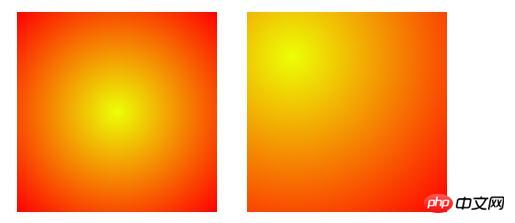
可以看出兩個線性漸變的區別就在于background-image: linear-gradient();里的三個顏色值的第一個顏色值(#fd0d0d)變成了角度值:45deg。 2. css 徑向背景漸變樣式 css徑向顏色漸變(Radial Gradients)跟線性漸變(linear gradients)不一樣,它不是沿著一個方向漸變,而是以一個點為中心,向四周輻射漸變,360度的。目前除了IE外的所有瀏覽器都支持css徑向顏色漸變(Radial Gradients),但它們也都有各自不同的語法 語法: background-image: radial-gradient([<position> || <angle>],[<shape> || <size>],<stop>,<stop>,<stop>) 代碼實例(考慮瀏覽器兼容性): <!DOCTYPE html>
<html>
<head>
<meta charset="UTF-8">
<title>css背景漸變--徑向漸變</title>
<style>
.demo{
width:500px ;
height:200px;
margin: 50px auto;
}
.demo *{
width:200px ;
height:200px;
margin: 50px 15px;
float: left;
}
.demo1{
background-image: -moz-radial-gradient(#ecff05, red);
background-image: -webkit-gradient(radial, center center, 0, center center, 220, from(#ecff05), to(red)); /* old */
background-image: -webkit-radial-gradient(#ecff05, red); /* new syntax */
background-image: radial-gradient(#ecff05, red);
}
.demo2{
background-image: -moz-radial-gradient(45px 45px 45deg, circle cover, #ecff05 0%, orange 100%, red 95%);
background-image: -webkit-radial-gradient(45px 45px, circle cover, #ecff05, red);
background-image: radial-gradient(45px 45px 45deg, circle cover, #ecff05 0%, orange 100%, red 95%);
}
</style>
</head>
<body>
<div class="demo">
<div class="demo1"></div>
<div class="demo2"></div>
</div>
</body>
</html>效果圖:
二、css 字體文字漸變 樣式 代碼實例(考慮瀏覽器兼容性): <!DOCTYPE html>
<html>
<head>
<meta charset="UTF-8">
<title>css字體文字漸變</title>
<style>
.demo{
width:500px ;
height:200px;
margin: 50px auto;
font-size: 20px;
background-image: -webkit-gradient(linear, left 0, right 0, from(rgb(166, 4, 249)), to(rgb(251, 223, 11)));
/*必需加前綴 -webkit- 才支持這個text值 */
-webkit-background-clip: text;
/*text-fill-color會覆蓋color所定義的字體顏色: */
-webkit-text-fill-color: transparent;
}
</style>
</head>
<body>
<div class="demo">css字體文字漸變,css字體文字漸變</div>
</body>
</html>效果圖:
核心代碼: background-image:定義用到的漸變顏色范圍; 注: 由于目前text-fill-color屬性貌似就webkit核心的瀏覽器支持,所以兩個demo頁面只能在Chrome瀏覽器或是Safari瀏覽器下才能看到漸變效果。Firefox瀏覽器下純色,IE下就更不用說了。 以上就是css如何實現漸變效果?css背景色漸變與文字漸變效果的實現(代碼實例)的詳細內容,更多請關注php中文網其它相關文章! 網站建設是一個廣義的術語,涵蓋了許多不同的技能和學科中所使用的生產和維護的網站。 |
溫馨提示:喜歡本站的話,請收藏一下本站!
本站發布的Win7純凈版系統、Win10純凈版和XP純凈版系統僅為個人學習測試使用,請在下載后24小時內刪除,不得用于任何商業用途,否則后果自負,請支持購買微軟正版軟件!
本站所有資源全部來自于網絡資源,如侵犯到您的權益,請及時通知我們(peng896066052@126.com),我們會及時處理.
Copyright © 2018-2020 雨林木風下載站