|
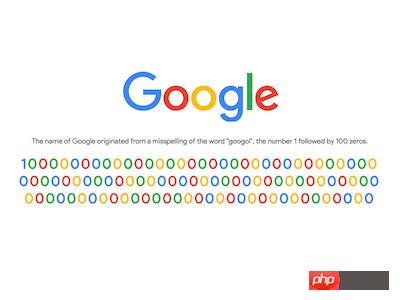
導讀網頁的本質就是超級文本標記語言,通過結合使用其他的Web技術(如:腳本語言、公共網關接口、組件等),可以創造出功能強大的網頁。因而,超級文本標記語言是萬維網(Web)編程的基礎,也就是說萬維網是建立... 網頁的本質就是超級文本標記語言,通過結合使用其他的Web技術(如:腳本語言、公共網關接口、組件等),可以創造出功能強大的網頁。因而,超級文本標記語言是萬維網(Web)編程的基礎,也就是說萬維網是建立在超文本基礎之上的。超級文本標記語言之所以稱為超文本標記語言,是因為文本中包含了所謂“超級鏈接”點。 本篇文章給大家帶來的內容是如何使用CSS在線字體和D3實現Google的信息圖 ,有一定的參考價值,有需要的朋友可以參考一下,希望對你有所幫助。效果預覽
源代碼下載https://github.com/comehope/front-end-daily-challenges 代碼解讀定義 dom,只有 1 個空元素,其中不包含任何文本: <div class="logo"></div> 引入字體文件,Product Sans 是 Google 專門為品牌推廣創建的無襯線字體: @import url("https://fonts.googleapis.com/css?family=Product+Sans");居中顯示: body {
margin: 0;
height: 100vh;
display: flex;
align-items: center;
justify-content: center;
}用偽元素制作 logo,注意 .logo::before {
content: 'google_logo';
font-size: 10vw;
}設置字體,采用剛才引入的在線字體,剛才頁面上的 body {
font-family: 'product sans';
}定義顏色變量: :root {
--blue: #4285f4;
--red: #ea4335;
--yellow: #fbbc05;
--green: #34a853;
}設置文字遮罩效果,為文字上色: .logo::before {
background-image: linear-gradient(
to right,
var(--blue) 0%, var(--blue) 26.5%,
var(--red) 26.5%, var(--red) 43.5%,
var(--yellow) 43.5%, var(--yellow) 61.5%,
var(--blue) 61.5%, var(--blue) 78.5%,
var(--green) 78.5%, var(--green) 84.5%,
var(--red) 84.5%, var(--red) 100%
);
-webkit-background-clip: text;
-webkit-text-fill-color: transparent;
}至此,Google logo 制作完成,接下來制作 googol 信息,說明 Google 的名字來源于含義是 1 后面跟 100 個零的大數的單詞 googol。 在 dom 中添加一行說明文本和容納數字的容器,容器中包含 5 個數字,在每個數字的內聯樣式中指定了顏色變量: <p class="desc">The name of Google originated from a misspelling of the word "googol", the number 1 followed by 100 zeros.</p>
<p class="zeros">
<span style="--c:var(--blue);">1</span>
<span style="--c:var(--red);">0</span>
<span style="--c:var(--yellow);">0</span>
<span style="--c:var(--blue);">0</span>
<span style="--c:var(--green);">0</span>
</p>設置說明文本的樣式: .desc {
font-size: 1.5vw;
font-weight: normal;
color: dimgray;
margin-top: 2em;
}設置數字的樣式: .zeros {
font-size: 3vw;
font-weight: bold;
margin-top: 0.2em;
text-align: center;
width: 25.5em;
word-wrap: break-word;
}為數字上色: .zeros span {
color: var(--c);
}微調數字 .zeros span:nth-child(1) {
margin-right: 0.2em;
}至此,靜態布局完成,接下來用 d3 批量處理數字。 引入 d3 庫,并刪除掉 dom 中 <script src="https://d3js.org/d3.v5.min.js"></script> 最終我們會在頁面上顯示 100 個 function getColor(excludedColor) {
let colors = new Set(['blue', 'red', 'yellow', 'green'])
colors.delete(excludedColor)
return Array.from(colors)[Math.floor(d3.randomUniform(0, colors.size)())]
}然后,定義 2 個常量, const ZEROS = d3.range(100).map(x=>0)
const ONE = {number: 1, color: 'blue'}接下來,通過用 let numbers = ZEROS.reduce(function (numberObjects, d) {
numberObjects.push({
number: d,
color: getColor(numberObjects[numberObjects.length - 1].color)
})
return numberObjects
}, [ONE])然后,以 d3.select('.zeros')
.selectAll('span')
.data(numberObjects)
.enter()
.append('span')
.style('--c', (d)=>`var(--${d.color})`)
.text((d)=>d.number)最后,微調一下內容的邊距,使整個內容居中: .logo {
margin-top: -10vh;
}大功告成! 相關推薦: CSS3文字特效屬性text-shadow的介紹,實例講解火焰文字效果以上就是如何使用CSS在線字體和D3實現Google的信息圖的詳細內容,更多請關注php中文網其它相關文章! 網站建設是一個廣義的術語,涵蓋了許多不同的技能和學科中所使用的生產和維護的網站。 |
溫馨提示:喜歡本站的話,請收藏一下本站!
本站發布的Win7純凈版系統、Win10純凈版和XP純凈版系統僅為個人學習測試使用,請在下載后24小時內刪除,不得用于任何商業用途,否則后果自負,請支持購買微軟正版軟件!
本站所有資源全部來自于網絡資源,如侵犯到您的權益,請及時通知我們(peng896066052@126.com),我們會及時處理.
Copyright © 2018-2020 雨林木風下載站