|
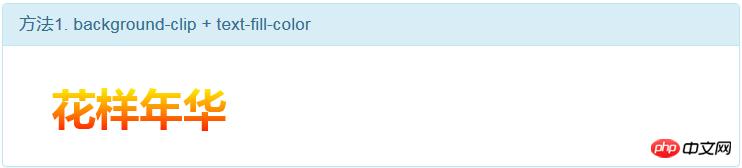
導(dǎo)讀網(wǎng)頁的本質(zhì)就是超級文本標(biāo)記語言,通過結(jié)合使用其他的Web技術(shù)(如:腳本語言、公共網(wǎng)關(guān)接口、組件等),可以創(chuàng)造出功能強大的網(wǎng)頁。因而,超級文本標(biāo)記語言是萬維網(wǎng)(Web)編程的基礎(chǔ),也就是說萬維網(wǎng)是建立... 網(wǎng)頁的本質(zhì)就是超級文本標(biāo)記語言,通過結(jié)合使用其他的Web技術(shù)(如:腳本語言、公共網(wǎng)關(guān)接口、組件等),可以創(chuàng)造出功能強大的網(wǎng)頁。因而,超級文本標(biāo)記語言是萬維網(wǎng)(Web)編程的基礎(chǔ),也就是說萬維網(wǎng)是建立在超文本基礎(chǔ)之上的。超級文本標(biāo)記語言之所以稱為超文本標(biāo)記語言,是因為文本中包含了所謂“超級鏈接”點。 本篇文章給大家?guī)淼膬?nèi)容是關(guān)于css3如何實現(xiàn)文字漸變?css3實現(xiàn)文字漸變的三種方法(代碼),有一定的參考價值,有需要的朋友可以參考一下,希望對你有所幫助。在開發(fā)過程中,UI設(shè)計師經(jīng)常會設(shè)計一些帶漸變文字的設(shè)計圖,給到我們程序員,而我們程序員們呢,大多都是默默地嘆息傳來,不過CSS3的誕生,解決了前端開發(fā)過程中的好多個難題,比如動畫,遮罩等等 1. 我們今天要實現(xiàn)的就是使用純CSS實現(xiàn)漸變文字,下面是預(yù)覽圖片:
2. 基礎(chǔ)樣式: .gradient-text{
text-align: left;
text-indent:30px;
line-height: 50px;
font-size:40px;
font-weight:bolder;
position: relative;
}3. 第一種方法,使用 background-cli、 text-fill-color: .gradient-text-one{
background-image:-webkit-linear-gradient(bottom,red,#fd8403,yellow);
-webkit-background-clip:text;
-webkit-text-fill-color:transparent;
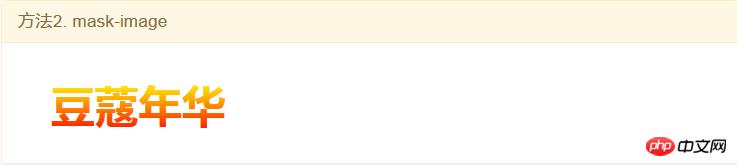
}4. 第二種方法,使用 mask-image: .gradient-text-two{
color:red;
}
.gradient-text-two[data-content]::after{
content:attr(data-content);
display: block;
position:absolute;
color:yellow;
left:0;
top:0;
z-index:2;
-webkit-mask-image:-webkit-gradient(linear, 0 0, 0 bottom, from(yellow), to(rgba(0, 0, 255, 0)));
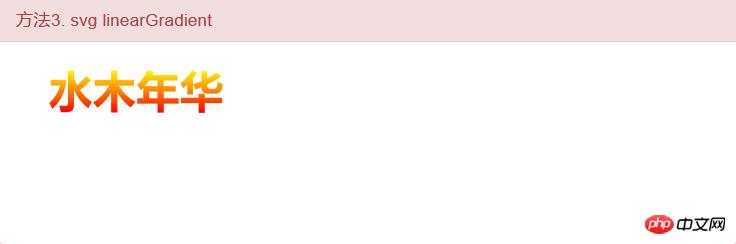
}5.第三種方法,使用 linearGradient、fill: .gradient-text-three{
fill:url(#SVGID_1_);
font-size:40px;
font-weight:bolder;
}<svg viewBoxs="0 0 500 300" class="svgBox">
<defs>
<linearGradient id="SVGID_1_" gradientUnits="userSpaceOnUse" x1="0" y1="10" x2="0" y2="50">
<stop offset="0" style="stop-color:yellow"/>
<stop offset="0.5" style="stop-color:#fd8403"/>
<stop offset="1" style="stop-color:red"/>
</linearGradient>
</defs>
<text text-anchor="middle" class="gradient-text-three" x="110px" y="30%">花信年華</text>
</svg>6. 該DEMO全部代碼: <!DOCTYPE html>
<html>
<head>
<meta charset="utf-8">
<meta name="viewport" content="width=device-width, user-scalable=no, initial-scale=1.0, maximum-scale=1.0, minimum-scale=1.0">
<title>CSS3漸變字體</title>
<link rel="stylesheet" href="https://cdn.bootcss.com/bootstrap/3.3.7/css/bootstrap.min.css">
<script src="https://cdn.bootcss.com/jquery/2.1.1/jquery.min.js"></script>
<script src="https://cdn.bootcss.com/bootstrap/3.3.7/js/bootstrap.min.js"></script>
<style type="text/css">
*{margin:0;padding:0;}
body,html{width:100%;height:100%;}
.wrapper{width:80%;margin:0 auto;margin-top:30px;}
.gradient-text{
              text-align: left;
              text-indent:30px;
              line-height: 50px;
              font-size:40px;
              font-weight:bolder;
              position: relative;
              }
.gradient-text-one{
    background-image:-webkit-linear-gradient(bottom,red,#fd8403,yellow);
    -webkit-background-clip:text;
    -webkit-text-fill-color:transparent;
}
.gradient-text-two{
   color:red;
}
.gradient-text-two[data-content]::after{
    content:attr(data-content);
    display: block;
    position:absolute;
    color:yellow;
    left:0;
    top:0;
    z-index:2;
    -webkit-mask-image:-webkit-gradient(linear, 0 0, 0 bottom, from(yellow), to(rgba(0, 0, 255, 0)));
}
.gradient-text-three{
    fill:url(#SVGID_1_);
    font-size:40px;
    font-weight:bolder;
}
</style>
</head>
<body>
<section class="wrapper">
<div class="panel panel-info">
<div class="panel-heading">
<h3 class="panel-title">方法1. background-clip + text-fill-color</h3>
</div>
<div class="panel-body">
<h3 class="gradient-text gradient-text-one">花樣年華</h3>
</div>
</div>
<div class="panel panel-warning">
<div class="panel-heading">
<h3 class="panel-title">方法2. mask-image</h3>
</div>
<div class="panel-body">
<h3 class="gradient-text gradient-text-two" data-content="豆蔻年華">豆蔻年華</h3>
</div>
</div>
<div class="panel panel-danger">
<div class="panel-heading">
<h3 class="panel-title">方法3. svg linearGradient</h3>
</div>
<div class="panel-body">
<svg viewBoxs="0 0 500 300" class="svgBox">
    <defs>
        <linearGradient id="SVGID_1_" gradientUnits="userSpaceOnUse" x1="0" y1="10" x2="0" y2="50">
            <stop  offset="0" style="stop-color:yellow"/>
            <stop  offset="0.5" style="stop-color:#fd8403"/>
            <stop  offset="1" style="stop-color:red"/>
        </linearGradient>
    </defs>
    <text text-anchor="middle" class="gradient-text-three" x="110px" y="30%">花信年華</text>
</svg>
</div>
</div>
</section>
</body>
</html>相關(guān)推薦: DIV+CSS+JS實現(xiàn)的文字色彩漸變(轉(zhuǎn)載)_html/css_WEB-ITnose 以上就是css3如何實現(xiàn)文字漸變?css3實現(xiàn)文字漸變的三種方法(代碼)的詳細內(nèi)容,更多請關(guān)注php中文網(wǎng)其它相關(guān)文章! 網(wǎng)站建設(shè)是一個廣義的術(shù)語,涵蓋了許多不同的技能和學(xué)科中所使用的生產(chǎn)和維護的網(wǎng)站。 |
溫馨提示:喜歡本站的話,請收藏一下本站!
本站發(fā)布的Win7純凈版系統(tǒng)、Win10純凈版和XP純凈版系統(tǒng)僅為個人學(xué)習(xí)測試使用,請在下載后24小時內(nèi)刪除,不得用于任何商業(yè)用途,否則后果自負,請支持購買微軟正版軟件!
本站所有資源全部來自于網(wǎng)絡(luò)資源,如侵犯到您的權(quán)益,請及時通知我們(peng896066052@126.com),我們會及時處理.
Copyright © 2018-2020 雨林木風(fēng)下載站