|
導讀網頁的本質就是超級文本標記語言,通過結合使用其他的Web技術(如:腳本語言、公共網關接口、組件等),可以創(chuàng)造出功能強大的網頁。因而,超級文本標記語言是萬維網(Web)編程的基礎,也就是說萬維網是建立... 網頁的本質就是超級文本標記語言,通過結合使用其他的Web技術(如:腳本語言、公共網關接口、組件等),可以創(chuàng)造出功能強大的網頁。因而,超級文本標記語言是萬維網(Web)編程的基礎,也就是說萬維網是建立在超文本基礎之上的。超級文本標記語言之所以稱為超文本標記語言,是因為文本中包含了所謂“超級鏈接”點。 JavaScript如何動態(tài)更改CSS頁面樣式?如果要在JavaScript中更改頁面樣式,需要更改元素的樣式屬性,下面我們就來看看具體的實現內容。
我們來直接看示例 代碼如下 JavaScriptChangeCssTextBox.html <!DOCTYPE html>
<html>
<head>
<meta charset="utf-8">
<title></title>
<script type="text/javascript">
function SetColor(foreColor, backColor) {
  target = document.getElementById("page");
if (target != null) {
    target.style.backgroundColor = document.form1.Text1.value;;
    target.style.color = document.form1.Text2.value;
  }
}
</script>
</head>
<body id="page">
<form name="form1">
<div>背景色<input id="Text1" type="text" /></div>
<div>前景色<input id="Text2" type="text" /></div>
<input id="Button1" type="button" value="button" onclick="SetColor()"/>
</form>
</body>
</html>說明: 單擊表單上的按鈕執(zhí)行用JavaScript編寫的SetColor()函數。 function SetColor(foreColor, backColor) {
target = document.getElementById("page");
if (target != null) {
target.style.backgroundColor = document.form1.Text1.value;;
target.style.color = document.form1.Text2.value;
}
}在SetColor函數中調用document.getElementById方法,可以從被設定為Body標簽的ID中獲取Body標簽的Element。如果取得了Element(target!= Null),就可以將Element的style屬性的background屬性和color屬性設置為文本框的值。 運行結果 執(zhí)行HTML文件。將顯示如下所示的效果。
在文本框中輸入顏色編碼,然后點擊“button”按鈕,就會顯示如下所示的效果
輸入其他顏色的編碼,然后單擊button按鈕,頁面將變?yōu)槠渌伾?/p> 我們下面接著來看下一個示例 代碼如下 JavaScriptChangeCssParameter.html <!DOCTYPE html>
<html>
<head>
<meta charset="utf-8">
<title></title>
<script type="text/javascript">
window.onload = function onLoad() {
param = GetQueryString();
target = document.getElementById("page");
if (param != null) {
if (param["bgcolor"] != null) {
target.style.backgroundColor = "#" + param["bgcolor"];
}
if (param["fgcolor"] != null) {
target.style.color="#"+ param["fgcolor"];
}
}
}
function GetQueryString() {
if (1 < document.location.search.length) {
// 獲取不包括第一個字符的字符串(?符號)
var query = document.location.search.substring(1);
// 使用查詢分隔符(&)將字符串拆分為數組
var parameters = query.split('&');
var result = new Object();
for (var i = 0; i < parameters.length; i++) {
// 拆分為參數名稱和參數值
var element = parameters[i].split('=');
var paramName = decodeURIComponent(element[0]);
var paramValue = decodeURIComponent(element[1]);
// 將參數添加到參數作為關聯(lián)數組,參數名稱為鍵
result[paramName] = decodeURIComponent(paramValue);
}
return result;
}
return null;
}
</script>
</head>
<body id="page">
<div>這是一個測試頁面</div>
<div>啦啦啦啦</div>
<div>哈哈哈哈</div>
</body>
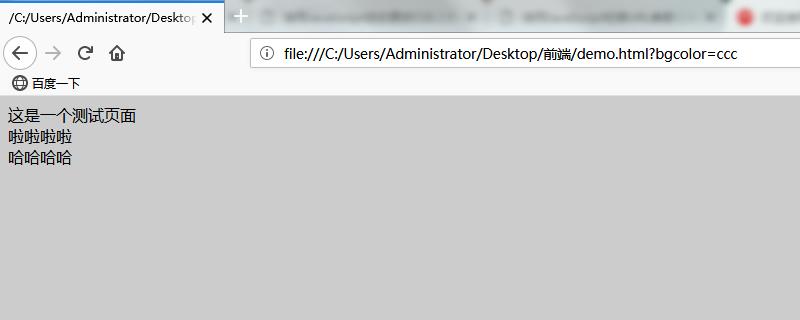
</html>說明: 它類似于以前的HTML文件,但從HTML文件的參數中獲取顏色代碼并更改前景色和背景色 運行結果: 執(zhí)行HTML文件,將顯示如下所示的效果。
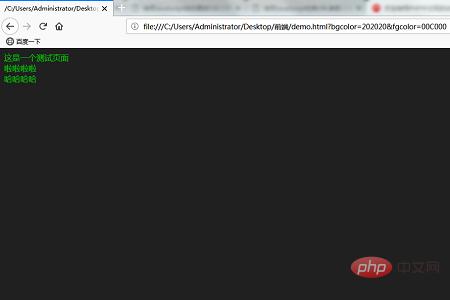
下面是“?bgcolor=202020&fgcolor=00C000”的結果。前景色也改變了。
以上就是本篇文章的全部內容了,更多相關精彩內容的學習可以移步到php中文網的JavaScript視頻教程欄目!!!! 以上就是JavaScript如何動態(tài)更改CSS頁面樣式的詳細內容,更多請關注php中文網其它相關文章! 網站建設是一個廣義的術語,涵蓋了許多不同的技能和學科中所使用的生產和維護的網站。 |
溫馨提示:喜歡本站的話,請收藏一下本站!
本站發(fā)布的Win7純凈版系統(tǒng)、Win10純凈版和XP純凈版系統(tǒng)僅為個人學習測試使用,請在下載后24小時內刪除,不得用于任何商業(yè)用途,否則后果自負,請支持購買微軟正版軟件!
本站所有資源全部來自于網絡資源,如侵犯到您的權益,請及時通知我們(peng896066052@126.com),我們會及時處理.
Copyright © 2018-2020 雨林木風下載站