|
導讀微信小程序,簡稱小程序,英文名Mini Program,是一種不需要下載安裝即可使用的應用,它實現了應用“觸手可及”的夢想,用戶掃一掃或搜一下即可打開應用。小程序是一種不用下載就能使用的應用,也是一... 微信小程序,簡稱小程序,英文名Mini Program,是一種不需要下載安裝即可使用的應用,它實現了應用“觸手可及”的夢想,用戶掃一掃或搜一下即可打開應用。小程序是一種不用下載就能使用的應用,也是一項門檻非常高的創新,經過將近兩年的發展,已經構造了新的小程序開發環境和開發者生態。 這篇文章主要介紹了微信小程序圖表插件(wx-charts)實例代碼,具有一定的參考價值,感興趣的小伙伴們可以參考一下。微信小程序圖表工具,charts for WeChat small app 基于canvas繪制,體積小巧 支持圖表類型
參數說明 opts Object opts.canvasId String required 微信小程序canvas-id opts.width Number required canvas寬度,單位為px opts.height Number required canvas高度,單位為px opts.title Object (only for ring chart) opts.title.name String 標題內容 opts.title.fontSize Number 標題字體大小(可選,單位為px) opts.title.color String 標題顏色(可選) opts.subtitle Object (only for ring chart) opts.subtitle.name String 副標題內容 opts.subtitle.fontSize Number 副標題字體大小(可選,單位為px) opts.subtitle.color String 副標題顏色(可選) opts.animation Boolean default true 是否動畫展示 opts.legend Boolen default true 是否顯示圖表下方各類別的標識 opts.type String required 圖表類型,可選值為pie, line, column, area, ring opts.categories Array required (餅圖、圓環圖不需要) 數據類別分類 opts.dataLabel Boolean default true 是否在圖表中顯示數據內容值 opts.dataPointShape Boolean default true 是否在圖表中顯示數據點圖形標識 opts.xAxis Object X軸配置 opts.xAxis.disableGrid Boolean default false 不繪制X軸網格 opts.yAxis Object Y軸配置 opts.yAxis.format Function 自定義Y軸文案顯示 opts.yAxis.min Number Y軸起始值 opts.yAxis.max Number Y軸終止值 opts.yAxis.title String Y軸title opts.yAxis.disabled Boolean default false 不繪制Y軸 opts.series Array required 數據列表 數據列表每項結構定義 dataItem Object dataItem.data Array required (餅圖、圓環圖為Number) 數據 dataItem.color String 例如#7cb5ec 不傳入則使用系統默認配色方案 dataItem.name String 數據名稱 dateItem.format Function 自定義顯示數據內容 Example pie chart var wxCharts = require('wxcharts.js');
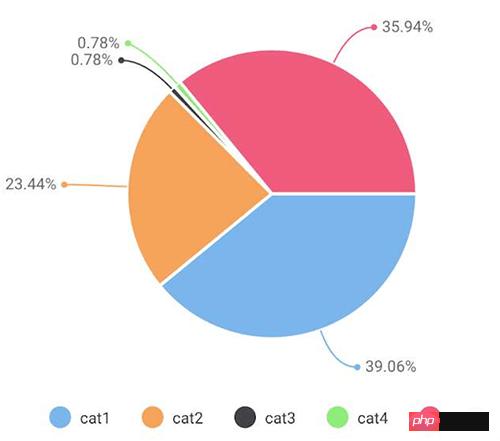
new wxCharts({
canvasId: 'pieCanvas',
type: 'pie',
series: [{
name: 'cat1',
data: 50,
}, {
name: 'cat2',
data: 30,
}, {
name: 'cat3',
data: 1,
}, {
name: 'cat4',
data: 1,
}, {
name: 'cat5',
data: 46,
}],
width: 360,
height: 300,
dataLabel: true
});
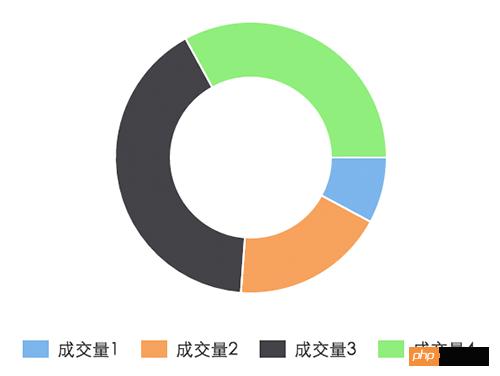
ring chart new wxCharts({
canvasId: 'ringCanvas',
type: 'ring',
series: [{
name: '成交量1',
data: 15,
}, {
name: '成交量2',
data: 35,
}, {
name: '成交量3',
data: 78,
}, {
name: '成交量4',
data: 63,
}],
width: 320,
height: 200,
dataLabel: false
});
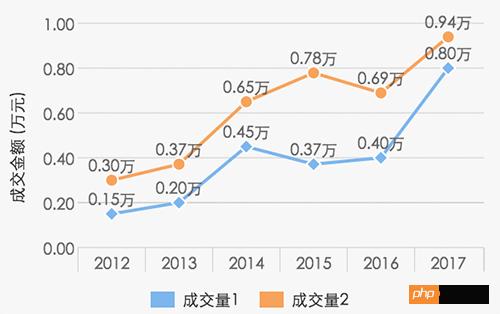
line chart new wxCharts({
canvasId: 'lineCanvas',
type: 'line',
categories: ['2012', '2013', '2014', '2015', '2016', '2017'],
series: [{
name: '成交量1',
data: [0.15, 0.2, 0.45, 0.37, 0.4, 0.8],
format: function (val) {
return val.toFixed(2) + '萬';
}
}, {
name: '成交量2',
data: [0.30, 0.37, 0.65, 0.78, 0.69, 0.94],
format: function (val) {
return val.toFixed(2) + '萬';
}
}],
yAxis: {
title: '成交金額 (萬元)',
format: function (val) {
return val.toFixed(2);
},
min: 0
},
width: 320,
height: 200
});
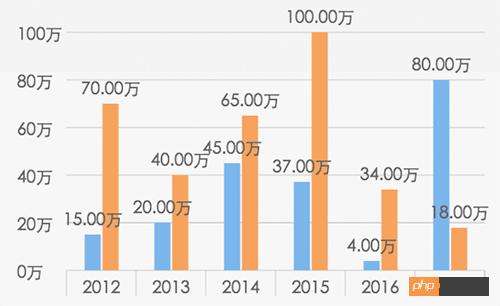
columnChart new wxCharts({
canvasId: 'columnCanvas',
type: 'column',
categories: ['2012', '2013', '2014', '2015', '2016', '2017'],
series: [{
name: '成交量1',
data: [15, 20, 45, 37, 4, 80]
}, {
name: '成交量2',
data: [70, 40, 65, 100, 34, 18]
}],
yAxis: {
format: function (val) {
return val + '萬';
}
},
width: 320,
height: 200
});
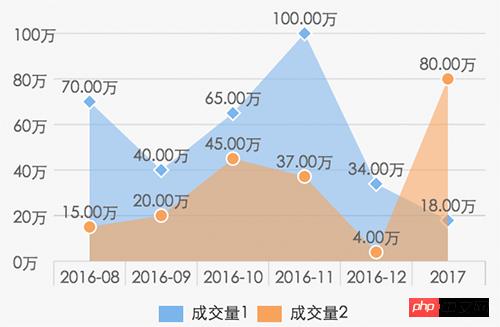
areaChart new wxCharts({
canvasId: 'areaCanvas',
type: 'area',
categories: ['2016-08', '2016-09', '2016-10', '2016-11', '2016-12', '2017'],
series: [{
name: '成交量1',
data: [70, 40, 65, 100, 34, 18],
format: function (val) {
return val.toFixed(2) + '萬';
}
}, {
name: '成交量2',
data: [15, 20, 45, 37, 4, 80],
format: function (val) {
return val.toFixed(2) + '萬';
}
}],
yAxis: {
format: function (val) {
return val + '萬';
}
},
width: 320,
height: 200
});
以上就是本文的全部內容,希望對大家的學習有所幫助,更多相關內容請關注PHP中文網! 相關推薦: 以上就是微信小程序圖表插件(wx-charts)的介紹的詳細內容,更多請關注php中文網其它相關文章! 小程序是一種不需要下載安裝即可使用的應用,它實現了應用“觸手可及”的夢想,用戶掃一掃或者搜一下即可打開應用。 |
溫馨提示:喜歡本站的話,請收藏一下本站!
本站發布的Win7純凈版系統、Win10純凈版和XP純凈版系統僅為個人學習測試使用,請在下載后24小時內刪除,不得用于任何商業用途,否則后果自負,請支持購買微軟正版軟件!
本站所有資源全部來自于網絡資源,如侵犯到您的權益,請及時通知我們(peng896066052@126.com),我們會及時處理.
Copyright © 2018-2020 雨林木風下載站