|
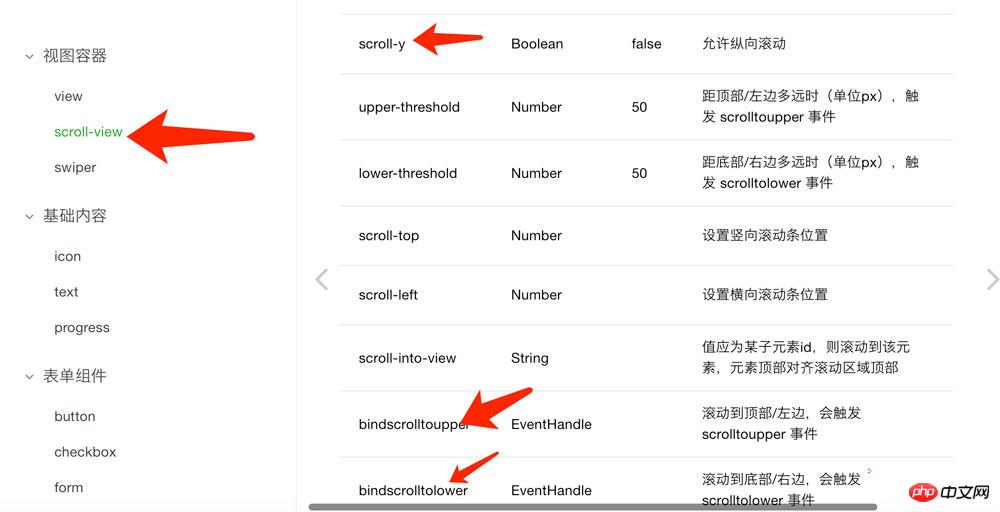
導讀微信小程序,簡稱小程序,英文名Mini Program,是一種不需要下載安裝即可使用的應用,它實現了應用“觸手可及”的夢想,用戶掃一掃或搜一下即可打開應用。小程序是一種不用下載就能使用的應用,也是一... 微信小程序,簡稱小程序,英文名Mini Program,是一種不需要下載安裝即可使用的應用,它實現了應用“觸手可及”的夢想,用戶掃一掃或搜一下即可打開應用。小程序是一種不用下載就能使用的應用,也是一項門檻非常高的創新,經過將近兩年的發展,已經構造了新的小程序開發環境和開發者生態。 本文主要介紹了微信小程序中實現列表的上拉加載和下拉刷新的方法。具有很好的參考價值。下面跟著小編一起來看下吧微信小程序可謂是9月21號之后最火的一個名詞了,一經出現真是轟炸了整個開發人員,當然很多App開發人員有了一個擔心,微信小程序的到來會不會讓移動端App顛覆,讓移動端的程序員失業,身為一個Android開發者我是不相信的,即使有,那也是需要個一兩年的過度和打磨才能實現的吧。 不管微信小程序是否能顛覆當今的移動開發格局,我們都要積極向上的心態去接收,去學習。不排斥新技術,所以,心動不如行動,趕緊先搭建一個微信小程序開發工具。那么接下來就讓我們來開始學習列表的上拉加載和下拉刷新的實現吧(通過聚合數據平臺獲取微信新聞)。 1.介紹幾個組件 1.1 scroll-view 組件
注意:使用豎向滾動時,需要給一個固定高度,通過 WXSS 設置 height。 1.2 image組件
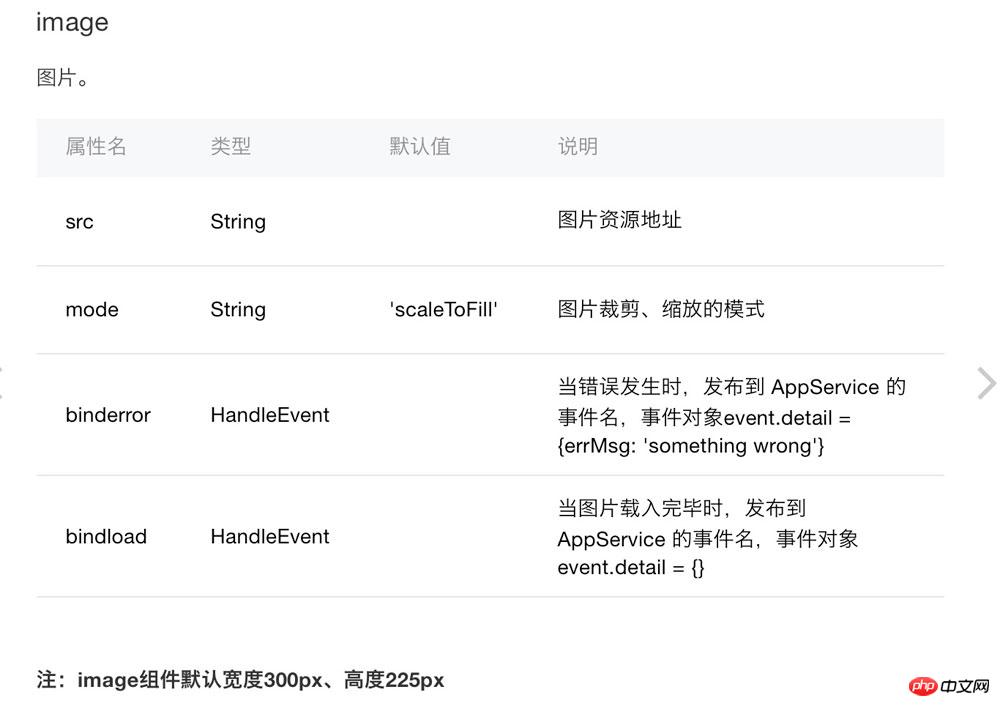
注意:mode有12種模式,其中3種是縮放模式,9種是裁剪模式。 1.3 Icon組件
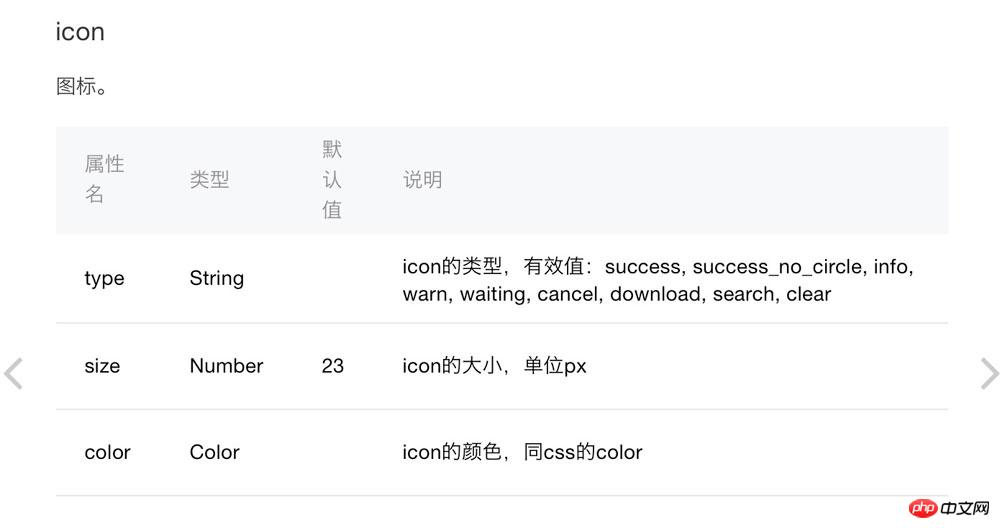
iconType: [
‘success', ‘info', ‘warn', ‘waiting', ‘safe_success', ‘safe_warn',
‘success_circle', ‘success_no_circle', ‘waiting_circle', ‘circle', ‘download',
‘info_circle', ‘cancel', ‘search', ‘clear'
]
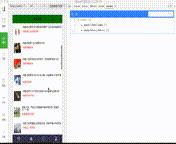
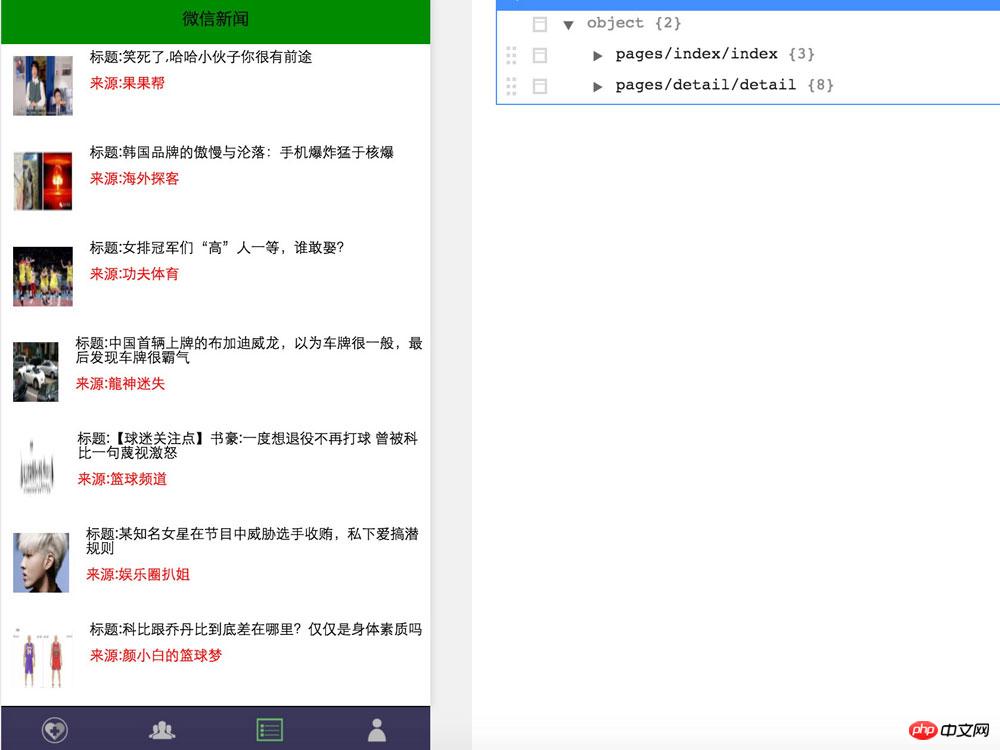
2.列表的上拉加載和下拉刷新的實現 2.1先來張效果圖
2.2邏輯很簡單,直接上代碼 2.2.1 detail.wxml 布局文件 <loading hidden="{{hidden}}" bindchange="loadingChange">
加載中...
</loading>
<scroll-view scroll-y="true" style="height: 100%;" bindscrolltolower="loadMore" bindscrolltoupper="refesh">
<view wx:if="{{hasRefesh}}" style="display: flex;flex-direction: row;align-items: center;align-self: center;justify-content: center;">
<icon type="waiting" size="45"/><text>刷新中...</text></view>
<view wx:else style="display:none" ><text></text></view>
<view class="lll" wx:for="{{list}}" wx:for-item="item" bindtap="bindViewTap"
data-title="{{item.title}}" >
<image style=" width: 50px;height: 50px;margin: 20rpx;" src="{{item.firstImg}}" ></image>
<view class="eee" >
<view style="margin:5px;font-size:8px"> 標題:{{item.title}}</view>
<view style="margin:5px;color:red;font-size:6px"> 來源:{{item.source}}</view>
</view>
</view>
<view class="tips1">
<view wx:if="{{hasMore}}" style="display: flex;flex-direction: row;align-items: center;align-self: center;justify-content: center;">
<icon type="waiting" size="45"/><text>玩命的加載中...</text></view>
<view wx:else><text>沒有更多內容了</text></view>
</view>
</scroll-view>2.2.1 detail.js邏輯代碼文件 var network_util = require('../../utils/network_util.js');
var json_util = require('../../utils/json_util.js');
Page({
data:{
// text:"這是一個頁面"
list:[],
dd:'',
hidden:false,
page: 1,
size: 20,
hasMore:true,
hasRefesh:false
},
onLoad:function(options){
var that = this;
var url = 'http://v.juhe.cn/weixin/query?key=f16af393a63364b729fd81ed9fdd4b7d&pno=1&ps=10';
network_util._get(url,
function(res){
that.setData({
list:res.data.result.list,
hidden: true,
});
},function(res){
console.log(res);
});
},
onReady:function(){
// 頁面渲染完成
},
onShow:function(){
// 頁面顯示
},
onHide:function(){
// 頁面隱藏
},
onUnload:function(){
// 頁面關閉
},
//點擊事件處理
bindViewTap: function(e) {
console.log(e.currentTarget.dataset.title);
},
//加載更多
loadMore: function(e) {
var that = this;
that.setData({
hasRefesh:true,});
if (!this.data.hasMore) return
var url = 'http://v.juhe.cn/weixin/query?key=f16af393a63364b729fd81ed9fdd4b7d&pno='+(++that.data.page)+'&ps=10';
network_util._get(url,
function(res){
that.setData({
list: that.data.list.concat(res.data.result.list),
hidden: true,
hasRefesh:false,
});
},function(res){
console.log(res);
})
},
//刷新處理
refesh: function(e) {
var that = this;
that.setData({
hasRefesh:true,
});
var url = 'http://v.juhe.cn/weixin/query?key=f16af393a63364b729fd81ed9fdd4b7d&pno=1&ps=10';
network_util._get(url,
function(res){
that.setData({
list:res.data.result.list,
hidden: true,
page:1,
hasRefesh:false,
});
},function(res){
console.log(res);
})
},
})最后的效果:
關于新聞的詳情實現,后面在實現 以上就是本文的全部內容,希望對大家的學習有所幫助,更多相關內容請關注PHP中文網! 相關推薦: 以上就是微信小程序列表的上拉加載和下拉刷新的實現的詳細內容,更多請關注php中文網其它相關文章! 小程序是一種不需要下載安裝即可使用的應用,它實現了應用“觸手可及”的夢想,用戶掃一掃或者搜一下即可打開應用。 |
溫馨提示:喜歡本站的話,請收藏一下本站!
本站發布的Win7純凈版系統、Win10純凈版和XP純凈版系統僅為個人學習測試使用,請在下載后24小時內刪除,不得用于任何商業用途,否則后果自負,請支持購買微軟正版軟件!
本站所有資源全部來自于網絡資源,如侵犯到您的權益,請及時通知我們(peng896066052@126.com),我們會及時處理.
Copyright © 2018-2020 雨林木風下載站